From my very egoistic perspective, the only thing truly missing in the IoT Sensor Badge is a proper iOS app (mind an Android app is available) but, as often is the case, every shortcoming can be seen as a challenge…
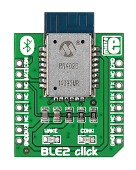
The IoT Sensor Badge is a sleek little promo board featuring the latest PIC16F18345 microcontrollers, a BLE module, five NeoPixel LEDs, an accelerometer and a temperature sensor, all powered by a single 1.5V alkaline (AAAA) battery via a small booster circuit.
I have tried in the past to create my own iOS apps in Swift, but that was just an entirely “different” experience. To be frank that was already better then my very first attempts in Objective C, no more will be said here about THAT …
Enters Pythonista 3 (briefly introduced in the previous post). Here is a brief recount of the few (mostly fun) steps that got me to a fully functional iOS app in minutes:
1- Figuring out the protocol used by the IoT Badge to communicate via Bluetooth Low Energy.
The IoT Badge promo web page contains a link to a downloadable MPLAB X project (zip) file. Once unzipped and opened in the IDE, it is easy to identify a module called “RN4020.c”. Unfortunately this is NOT where you will find the crucial bits of the BLE interface although, from the initialisation code, it will be revealed that the module is going to be used in MLDP mode! The true core of the communication interface is rather more cryptically hidden in the “interrupt.c” file where in fact all interrupt service routines are found. Hidden within the serial interface (EUSART) ISR lies the section of code we need to understand.
Here each character received (from the BLE module) is compared against a set of three possible ascii values:
        if (RCREG == '%') { //BUTTON1 PRRESS
            PIR0bits.IOCIF = 1;
            IOCBFbits.IOCBF5 = 1;
        }
        if (RCREG == '#') { //BUTTON2 PRRESS
            PIR0bits.IOCIF = 1;
            IOCBFbits.IOCBF7 = 1;
        }
When the ‘%’ or the ‘#’ characters are received a corresponding button press event is “simulated” by triggering manually the Interrupt on (pin) Change mechanism. This is a technique that I would not generally recommend but appears to be effective.
        if (RCREG == '$') { //Send requested data
            //CalcTEMP9700(); //Get temperature
            Temp9700Read();
            CalcVBattery(); //Get batter voltage
            TRISCbits.TRISC4 = 0; //NCO on
            NCO1INCL = 10;

            sprintf(s, "@%d, %d, %d, %d, %d, %d, %d, %d, %d, %d, %d, %d, %d, %d, %d, ", G1, R1, B1, G2, R2, B2, G3, R3, B3, G4, R4, B4, G5, R5, B5); //LED data
            USARTWriteString(s);
            sprintf(s, "%d, %d, %d, %d\r\n", (int8_t) Roll, (int8_t) Pitch, (int8_t) TEMP_F, BATTV); //XYZ, TEMP & BAT
            USARTWriteString(s);
If a ‘$’ character is received instead, the device is immediately launching in a sequence of calls to update the temperature and battery voltage readings. Eventually a long string is sent back to the BLE module containing in the order:
- The ‘@’ character
- 5x NeoPixel color coordinates as Green, Red, Blue triplets
- The last (cached) value of the Roll and Pitch angles (in degrees) computed from the accelerometer last reading
- The temperature, in degrees Fahrenheit
- The battery voltage, in hundreds of a Volt
- A Carriage Return and a New Line (‘/r’, ‘/n’) pair terminate the string
All values are sent as decimal and are comma and space separated! This makes for a long but humanly readable format, although not exactly a compact or easily parseable one. The choice to make the temperature and battery voltage calculations in addition to the long string formatting and transmission, “inside” an interrupt routine is particularly troublesome to me. Although it is not the only issue I would have with the code exposed in this project, it is beyond the point of this post, so we’ll gladly move to the next step.
2- Figuring out how MLDP works
MLDP is the solution that Microchip offers to embedded developers (like me) who are looking for a quick way to emulate a serial point-to-point connection over BLE. In the original Bluetooth standard, the Serial Profile was offering this feature out of the box. With BLE, the old profiles are gone and replaced instead by the GATT, a very flexible (and power efficient) way to define and handle data transfer via the sharing and remote update of “characteristics”. MLDP brings back the simplicity of the Serial Profile to BLE by offering an alternate mode of communication between the BLE module (RN4020 for example) and a microcontroller serial port (UART). Once the BLE module enters MLDP mode, all other details of the BLE protocol are abstracted away and as soon as a connection is established with a paired device, full bidirectional serial communication is established. Except finding out which characteristics (and service) is being used by MLDP to perform the trick requires a bit of hacking. The official documentation is careful to avoid such details to maintain the full abstraction. But using MCHP own tools (such as the Bluetooth Smart Data application or the the Smart Discover application, both available on the Apple Store) it is quite easy to figure out the (long) UUID published for the MLDP service and its data characteristic.
MLDP_SERVICE   = '00035B03-58E6-07DD-021A-08123A000300'
MLDP_DATA      = '00035B03-58E6-07DD-021A-08123A000301'
Armed with this information we can now proceed to create our Python script.
3- Exploring Pythonista 3 – Core Bluetooth module
The Core Bluetooth module (or simply ‘cb’) wraps nicely the functionality of the iOS BLE framework and its documentation includes two very useful example projects interfacing to similar embedded control boards.
All the logic can be encapsulated in a single “class” whose methods will be used as “delegate functions” for each step of a BLE connection process.
class MLDPManager (object):
    def __init__(self):
        self.peripheral = None
        self.buffer = ''

    def did_discover_peripheral(self, p):

    def did_discover_services(self, p, error):

    def did_discover_characteristics(self, s, error):
These “delegate functions” (or callbacks in embedded lingo) will ensure that we can find and connect with the ‘IoT Sensor Badge’ and the MLDP service/characteristic.
For example, once a service is “discovered”, we can compare its UUID with that of the MLDP_SERVICE found above, and immediately launch the search for the DATA characteristic:
    def did_discover_services(self, p, error):
        for s in p.services:
            if s.uuid == MLDP_SERVICE:
                p.discover_characteristics(s)
Similarly once the DATA characteristic is found, we can enable the ‘notification’ feature and store the resulting ‘handle’ (data_char) for later use during the communication data transfer phases:
   def did_discover_characteristics(self, s, error):
        for c in s.characteristics:
          if '301' in c.uuid:
              self.data_char = c
              # Enable notification for MLDP input:
              self.peripheral.set_notify_value(c, True)
4- Sending and receiving data with MLDP
Sending data (or a command) to the “other” side of the MLDP connection (the IoT Sensor Badge) is now possible by simply writing a new value to the DATA characteristic:
    def send_cmd(self, cmd):
        if self.peripheral:
          self.peripheral.write_characteristic_value(self.data_char, cmd, True)
When the IoT Sensor Badge is sending us new data (a bytearray) we will receive notifications, that is, our did_update_value delegate (callback) will be invoked:
    def did_update_value(self, c, error):
        self.buffer += c.value.decode('ascii')
        #print(c.value)
        if self.buffer[-1] in '\n':
          if self.buffer and self.buffer[0] == '@':
            print(self.buffer[1:]) # send to console
            self.buffer = ''
            self.send_cmd(b'$') # ask immediately for more...
Since the BLE protocol allows each characteristic to pass a maximum of 20 characters (bytes) at a time, the update delegate must perform a bit of buffering in order to re-assemble the longer strings the IoT Sensor is sure to send us.
5- A simple Console Interface
Pythonista 3 introduces a simple Console View for the iOS applications to provide a quick and dirty way to present data (and receive inputs) from the user without necessarily require a complete GUI to be defined.
A few lines of code will give us a quick way to test the code developed this far:
mngr = MLDPManager()
cb.set_central_delegate(mngr)
cb.scan_for_peripherals()
while not mngr.peripheral:
  pass
mngr.send_cmd(b'$')
This code launches the Bluetooth core manager waits for the connection to be established with the first IoT Sensor Badge found and the starts the process of continuous update by sending a first ‘$’ command.
The process will continue indefinitely as in a loop as the last line of the did_update_value delegate (callback) is sure to trigger the next request for data…
This will quickly fill your iPad/iPhone screen with the strings sent by the IoT Sensor.
Soon you will want to stop the script (use the little button at the top right of the console view) and inspect the data. Next, if you are like me, you will itch to create a bit of a UI for the application.
But that is a completely new adventure, which we’ll cover in the next part … stay tuned!
 Pythonista3